 Written by Facundo Piaggio (Solutions Architect)
A Practical Strategy to Improve Cold-Start Performance
Modern mobile apps rely on dozens of SDKs to deliver analytics, messaging, personalization, and other essential services. However, when all of these SDKs initialize during app startup, they place a heavy burden on the device — especially on low-end hardware or unstable networks. As a result, users often experience sluggish cold starts and delayed interaction.
To address this, we propose a pragmatic, production-ready strategy: delayed SDK initialization for Amplitude, Braze, and other heavy analytics or engagement SDKs. Instead of starting these SDKs immediately, you initialize them only after the app reaches a stable state.
Consequently, you avoid early competition for CPU, I/O, and bandwidth. This leads to faster cold starts, smoother first-run experiences, and reduced startup network congestion — all without sacrificing core analytics or messaging functionality.
🎯 Goal
Provide a clean, realistic strategy to improve app startup performance by deferring heavy SDK initialization until the moment your app actually needs them — usually after the user lands on the Home screen or after onboarding is completed.
This reduces:
- CPU spikes at app launch
- startup network storms
- UI jank during the first seconds of use
- cold-start times on poor networks or low-end devices
The outcome: better perceived performance, without losing analytics or messaging capability.

⚠️ Why Startup Slows Down
And why SDKs are often the culprit
When the app process boots, the OS is still allocating memory, setting up threads, and bringing your UI to life. During this process, the application starts multiple requests to your own servers to handle things like authentication. At that same moment, many SDKs:
- run class initializers
- touch disk / local storage
- spawn background threads
- perform network handshakes
- fetch experiments, configs, or user profiles
When 3–5 SDKs do this at once, startup becomes congested.
Typical symptoms include:
- ⏳ Long time-to-interactive (TTI)
- 😵 First-screen jank or stutter
- 📉 Increased likelihood of crashes/ANRs during launch
- 📡 Several simultaneous network calls competing for bandwidth
Research and platform guidance (especially on Android) consistently confirm the same point: deferring non-critical work is one of the most impactful cold-start optimizations available.
📉 Network & Bandwidth Impact
Several studies and case reports show:
- Reducing network calls during startup improves load time dramatically under 3G/4G and limited Wi-Fi.
- Apps that defer unused SDKs see 30–60% cold-start improvements in real conditions.
- Local caching and lazy initialization reduce the number of network round-trips needed during the first seconds.
Amplitude, Braze, and other vendors also document ways to control initial network activity.
🧩 What SDKs Do at Startup
Amplitude (default behavior)
On init, Amplitude typically:
- Reads device/user IDs
- Spins up event-processing threads
- Loads and writes disk-backed queues
- Optionally fetches config & experiment variants
- Starts buffering and sending queued events
Braze (default behavior)
The initialization can trigger:
- SDK setup & configuration
- Session management startup
- Background workers
- Content Cards / In-App Message refresh
- Push token registration
- User profile sync
Braze is known to perform meaningful synchronous work up front — which compounds when other SDKs do the same.
Combined impact
Initializing Amplitude + Braze + others at launch causes:
- Multiple parallel network requests
- CPU & I/O spikes
- Visible UI slowdown
- Bigger risk of startup failures in poor connectivity
This is exactly what we want to avoid.
🌟 The Proposed Strategy
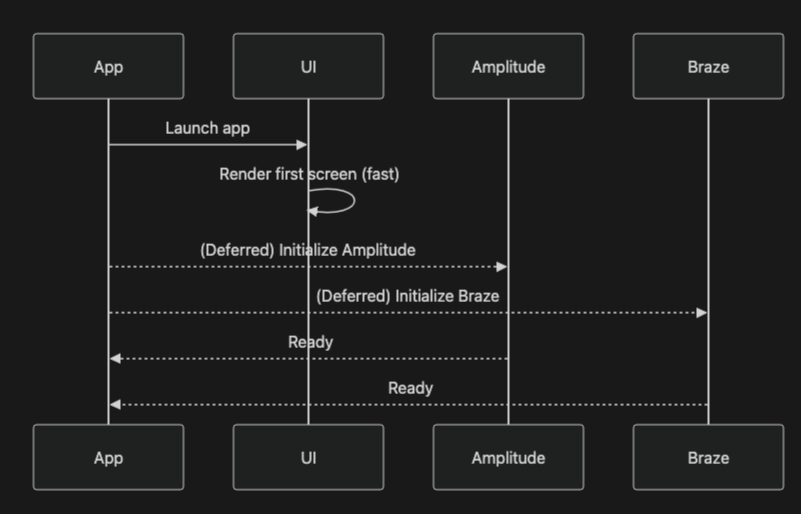
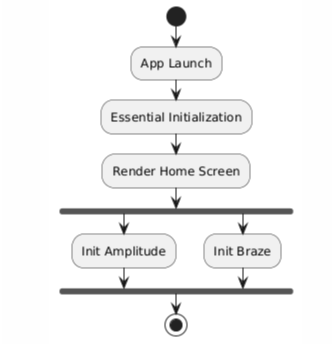
Delay Initialization Until the App Is Ready
Instead of initializing analytics and engagement SDKs in:
Application.onCreate()(Android)application(_:didFinishLaunchingWithOptions:)(iOS)
…we delay initialization until a predictable, safe moment, such as:
- When the Home screen becomes visible
- After onboarding is completed
- After a network connection is confirmed
- After first meaningful render
Benefits:
- Faster cold-start time
- Smoother UI on first screens
- Reduced startup network congestion
- Better experience in low-connectivity scenarios
🛠 SDK Support for Delayed Initialization
Braze
Braze provides official APIs for delayed initialization, such as:
enableDelayedInitialization / disableDelayedInitialization.
Android reference + iOs reference
Amplitude
Amplitude allows controlling startup behavior via:
- Initializing the client at a later point in the session. This behavior varies from one platform to the other. But you decide when to Configure the SDK.
- It’s also possible to optOut of tracking until the user give us permission, which can happen further during the session. Android, iOS
Recommendation
Always use vendor-provided delayed-init mechanisms when available — they handle internal edge cases.
🧭 Implementation Framework
Below is a cross-platform, practical guide.
Braze
Android
1. Configure XML (res/values/braze.xml):
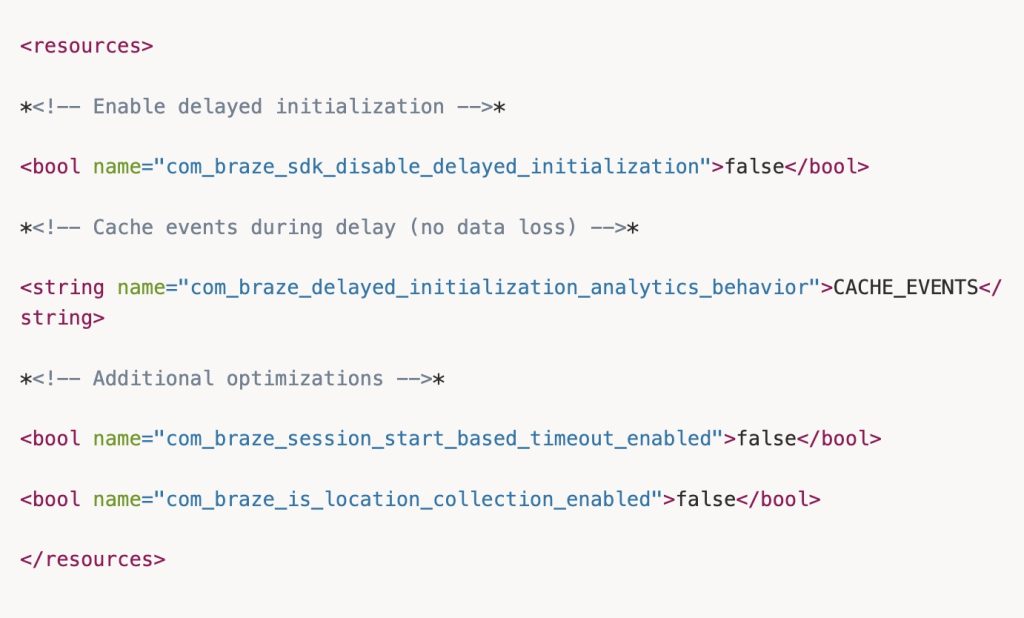
To access the code ready to copy and paste, see the link attached to the image.
2. Update Application Class:
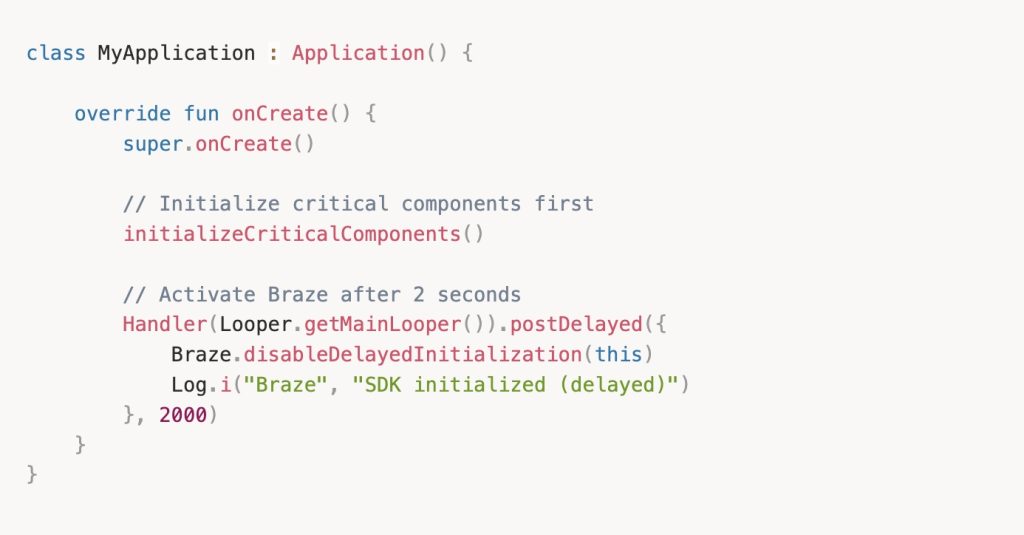
To access the code ready to copy and paste, see the link attached to the image.
iOS
1. call Braze.prepareForDelayedInitialization() as early as possible—ideally inside or before your application(_:didFinishLaunchingWithOptions:)
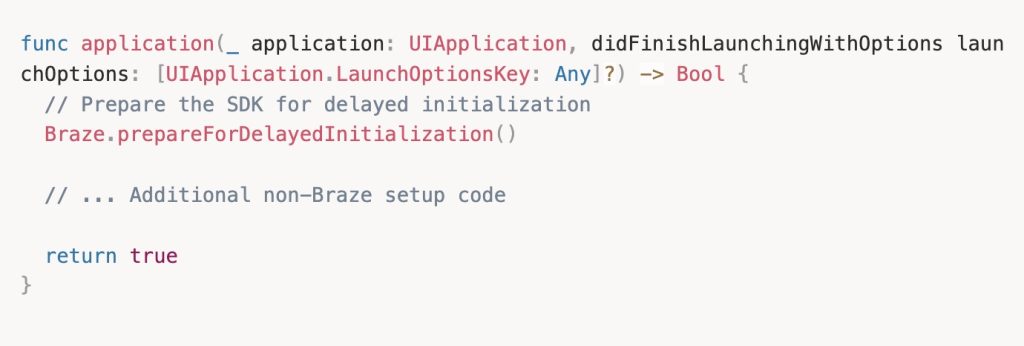
To access the code ready to copy and paste, see the link attached to the image.
Braze.prepareForDelayedInitialization(pushAutomation:) accepts an optional pushAutomation parameter. If set to nil, all push automation features are enabled, except requesting push authorization at launch.
How It Works
- Braze stays dormant during app startup
- Critical app network calls complete without competition
- After 2 seconds, Braze activates and sends cached events (In the example, you can control it)
- Zero data loss – events are automatically cached with CACHE_EVENTS mode (on Android)
Amplitude
1. Simply delay the SDK configuration process until a specific point on your app, and optionally opt out your user of tracking entirely (you should change the optOut key to false when you consider it’s the optimal point)
- Android
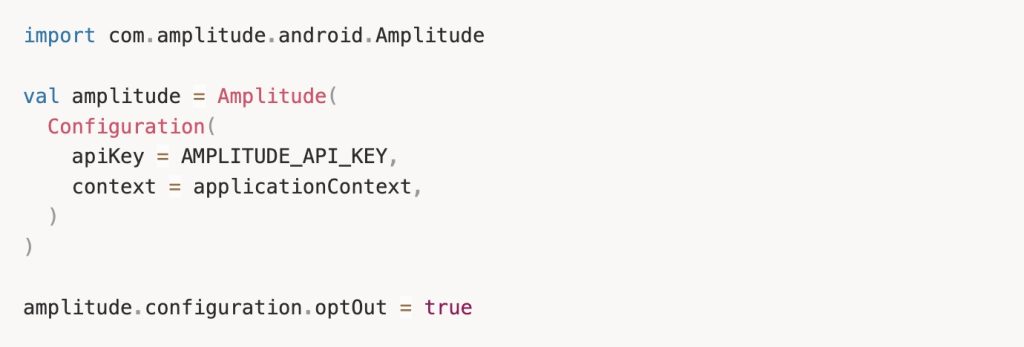
To access the code ready to copy and paste, see the link attached to the image.
- iOS
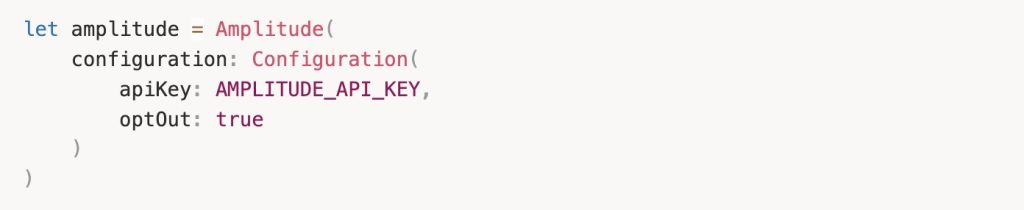
To access the code ready to copy and paste, see the link attached to the image.
⚖️ Trade-offs & Edge Cases
You may encounter:
🟡 Early events delayed/lost
Solution: queue in-memory or persist to disk until the SDK is ready.
🟡 Push notifications require special consideration
Braze push automation may require early setup — test carefully.
Option: initialize only the push-related components early.
🟡 Background launches (push open, deep links)
Ensure your fallback logic can initialize SDKs even when no UI is shown.
📊 What to Measure
To validate improvements, measure both before and after:
- Cold-start time (process start → first frame)
- Time-to-interactive (first frame → stable UI)
- Number and size of startup network requests
- Queue reliability for pre-init events
- Performance under throttled networks
🧪 Testing Framework
Test under:
- 3G/Edge throttled networks
- Low-end hardware
- First-run and repeat-run scenarios
- Background launches and deep links
- Push notification flows
- Experiment/feature flag fallback behavior
🏗 Proposed Architecture
Sequence Diagram (high-level)
💬 Ready to Improve Your Startup Performance?
Optimizing SDK load timing is a low-risk, high-reward tactic that many teams overlook. By implementing delayed SDK initialization, you reduce friction during cold start and ensure your most important user journeys begin smoothly.
Want help applying this strategy in your app or need a second opinion on your SDK architecture?
👉 Let’s talk. Whether you’re optimizing for scale, performance, or better first impressions, we’d love to hear what you’re working on.
📚 References
- Braze Android & iOS — Delayed Initialization docs
- Amplitude Android & iOS — Initialization docs
- Android performance case studies (lazy init guidance)
- Mobile network optimization research