If you work with Braze and run an eCommerce, there’s a Catalogs feature well worth knowing — one that can significantly change how you recover lost sales opportunities.
Braze Catalogs let you personalize messages with product data, but they hide something more: the ability to automate back-in-stock and price drop notifications with almost zero maintenance effort. The user shows interest, Braze logs it, and when the product changes, the notification is sent automatically.
What exactly is this?
Braze has something called Catalog Triggers — two specific types:
- Back in stock: automatically notify users who wanted an out-of-stock product when it becomes available again.
- Price drop: alert interested users when a product’s price drops according to a rule you define (for example, a drop of 10% or more).
Both work with the same logic: the user performs an action on your site or app → gets subscribed to that product → when the catalog changes, Braze fires the Canvas automatically.
The user lifecycle
To understand when each step happens, it’s worth walking through the full flow:
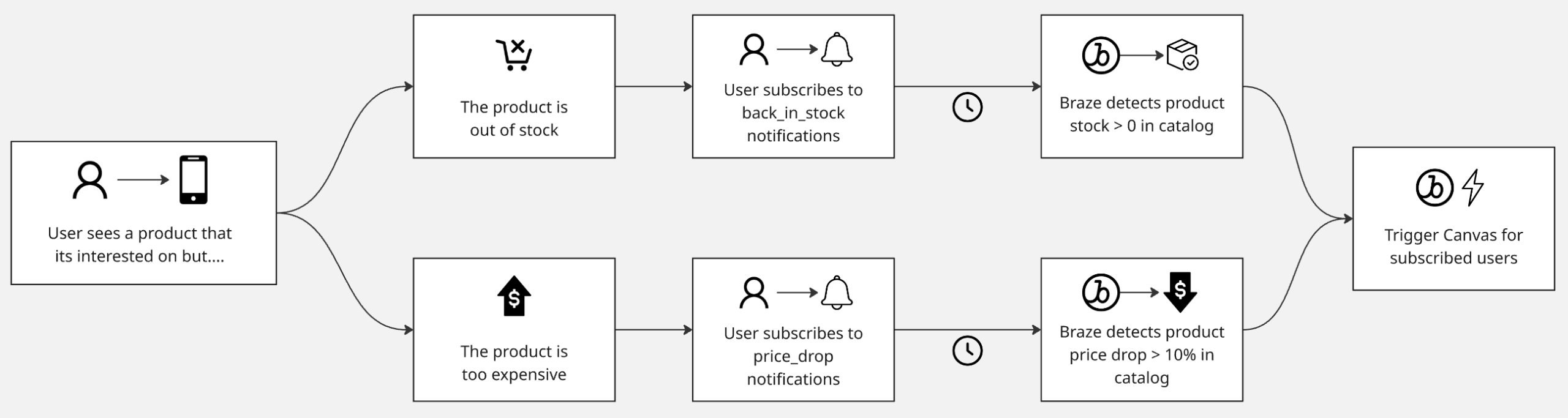
- The user visits an out-of-stock product or one outside their price range, and clicks “Notify me when it’s back” or “Notify me if the price drops.”
- That click fires a custom event with properties that include the item ID and subscription type.
- Braze logs the subscription, linking the user to that catalog item. The subscription lasts 90 days.
- When the catalog is updated — stock goes from 0 to available, or the price drops according to your rule — Braze detects it automatically.
- The Canvas is triggered and the user receives the notification.
How to implement it
The setup has two parts: the catalog and the Canvas.
On the catalog side
Global configuration is done under Data Settings > Catalogs. There you’ll find settings that apply to all your catalogs, where you configure:
- Fallback catalog: the catalog Braze uses for the subscription when the custom event doesn’t include the
catalog_nameproperty. Optional, but recommended to avoid orphaned subscriptions. - Subscription event: the custom event that triggers the user’s subscription (e.g.,
product_clicked). - Unsubscription event: the custom event that removes the user from the alert. This field is optional — if you don’t configure it, Braze automatically cancels the subscription after 90 days or when the notification fires, whichever comes first.
- Product ID event property: the property of the custom event that contains the catalog item ID.
Here’s an example of what that subscription event looks like. Note that the type property is an array, which allows subscribing the user to both alert types in a single event:
{
    "events": [
        {
            "external_id": "<external_id>",
            "name": "subscription",
            "time": "2024-04-15T19:22:28Z",
            "properties": {
                "id": "shirt-xl",
                "catalog_name": "on_sale_products",
                "type": ["price_drop", "back_in_stock"]
            }
        }
    ]
}
Once the global configuration is done, go to the specific catalog and under the Settings tab, toggle on Back in Stock or Price Drop as needed. Braze will ask you:
- Which catalog field represents stock or price — it must be numeric.
- Notification rules: whether you notify all subscribers at once or in batches, with a limit of 10,000 users per minute.
On the Canvas side
Create an action-based Canvas, select the corresponding trigger and catalog, and configure the steps like any other Canvas.
To personalize the message with the product data that triggered the notification, use Liquid with the context tag:
{% catalog_items productos {{context.${catalog_update}.item_id}} %}
El precio de {{ items[0].nombre }} bajó de ${{ context.${catalog_update}.previous_value }} a ${{
context.${catalog_update}.new_value }} 🔥🔥
With real values, the rendered message would look like this:
The price of Pro Bluetooth Headphones dropped from $74.99 to $59.99 🔥
Breaking down the Liquid:
context.${catalog_update}.item_id— the ID of the product that changed and triggered the notification.context.${catalog_update}.previous_value— the previous value (price or stock) before the change.context.${catalog_update}.new_value— the new value after the change.{% catalog_items products ... %}— fetches all product data from the catalog using that ID. Must go at the beginning of the message.items[0].<field_name>— access any catalog field throughout the message, e.g.items[0].nameoritems[0].category.
One detail to keep in mind: context is the current way to reference canvas_entry_properties — they are equivalent and backwards compatible.
Finally, if your catalog has a field called image_url, you can include the product image in the message with:
{% catalog_items <your_catalog_name> {{context.${catalog_update}.item_id}} %}
{{ items[0].image_url }}
A few things to consider before going live
- For a user to subscribe to a back-in-stock alert, the product must have zero stock at the time of subscription. If stock is greater than zero, Braze won’t register the subscription.
- Catalog notification rules don’t override Canvas settings like Quiet Hours — both apply.
- Braze supports up to 50,000 updated items per day that can trigger notifications.
- Subscriptions have a limit of 100 million active at the same time.
A feature that’s already ready to work for you
If you’re already using Catalogs in Braze, the incremental effort is low. The main work lies in making sure the custom event is being fired by the frontend with the correct properties. From there, the subscription and notification mechanism is managed automatically by Braze.
For businesses with variable inventory or dynamic pricing, this is one of the most direct ways to recover purchase intent that would otherwise simply be lost. The intent was always there — Braze just makes sure it doesn’t evaporate.
Want to implement this in your Braze stack? At Minders we can help you configure it and get the most out of it. Let’s talk!